Case study · 2026
IT Command Center.
Infrastructure health, prioritized. One operations console that shows whether every server is actually backed up, how long until storage runs out, and which certificates and app credentials expire next, across every backup platform, storage array and certificate authority the team runs.
Designed and built by Patrick Fineza
- My role
- Product owner, designer and engineer
- Audience
- IT infrastructure and operations team
- Platform
- Existing on-premises IIS; no new spend
- Status
- In production, polling every 15 minutes
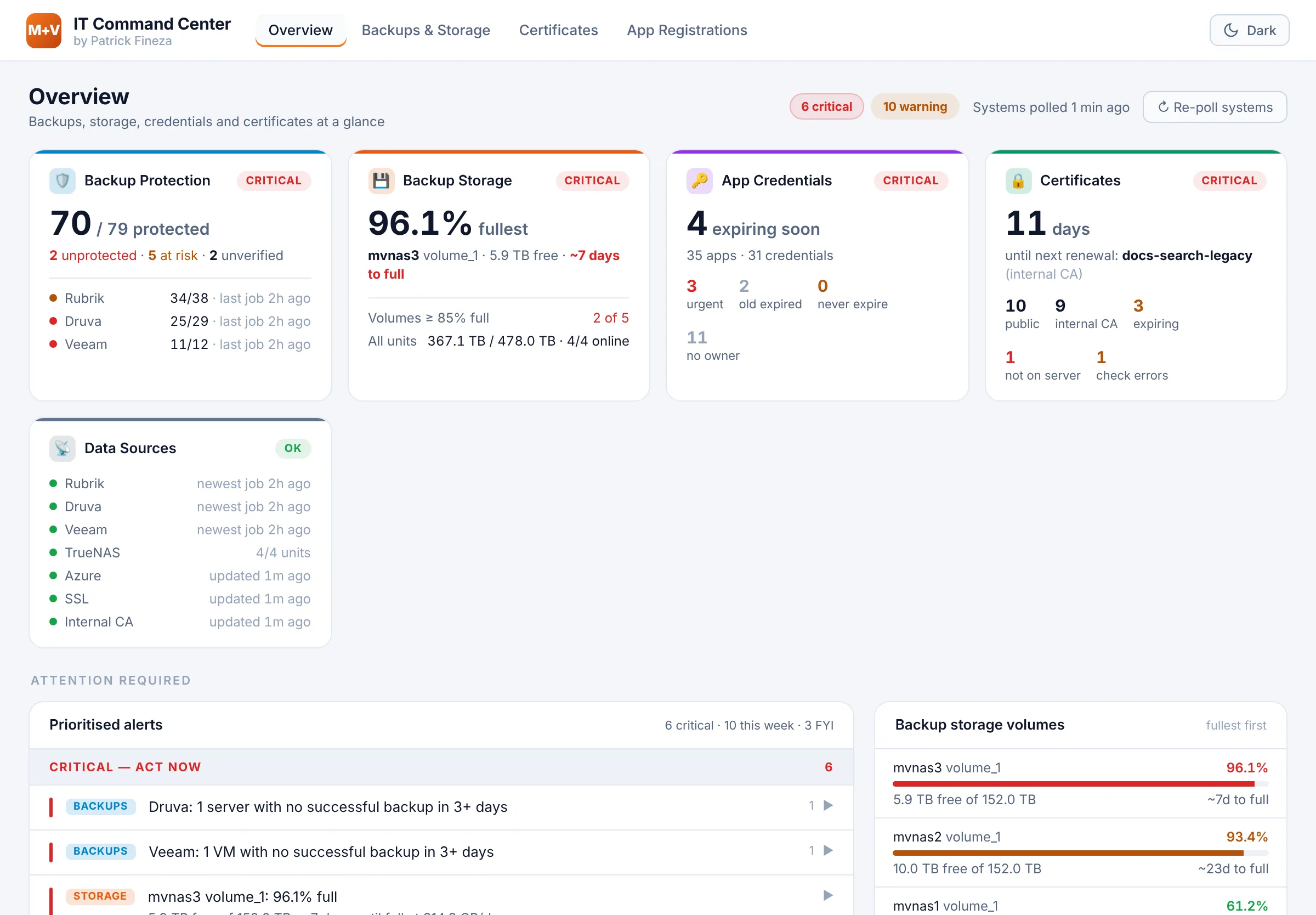
Seven sources. One answer.
Backup status lived in three vendor consoles, storage in each NAS’s own admin page, and certificates and app secrets in their own portals and tools. Every morning started with the same questions: Did last night’s backups work, for every server? Is anything about to fill up? What expires this month? I built the Command Center to answer them on one page, without anyone having to log in anywhere else.
Prioritized alerts
What needs attention, ranked.
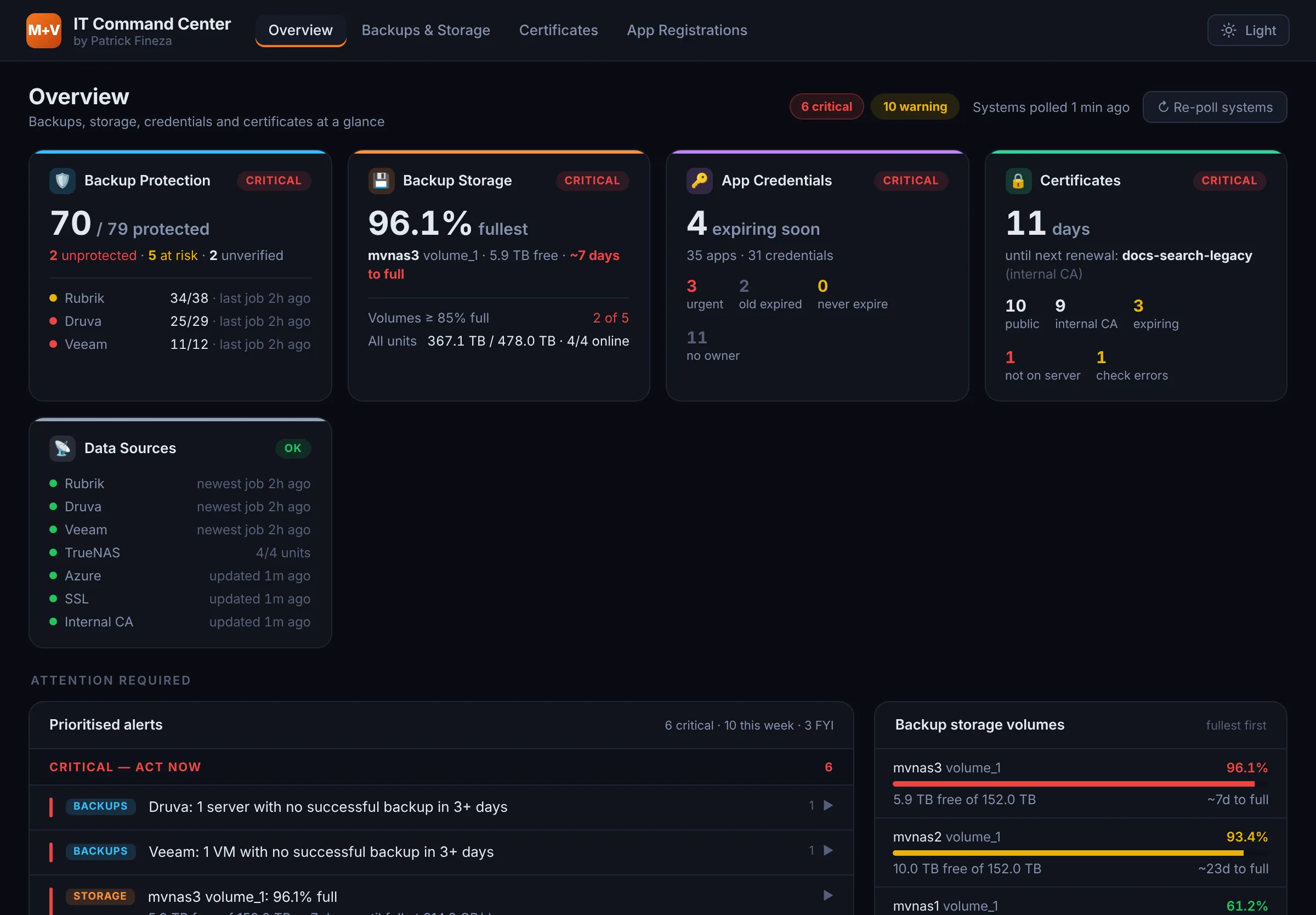
Every source feeds one list. Critical means act now: a server with no good backup in three days, a volume nearly full, a credential about to expire. This week holds what can wait a day; FYI holds the housekeeping. Each alert expands to the exact servers, volumes or apps behind it.
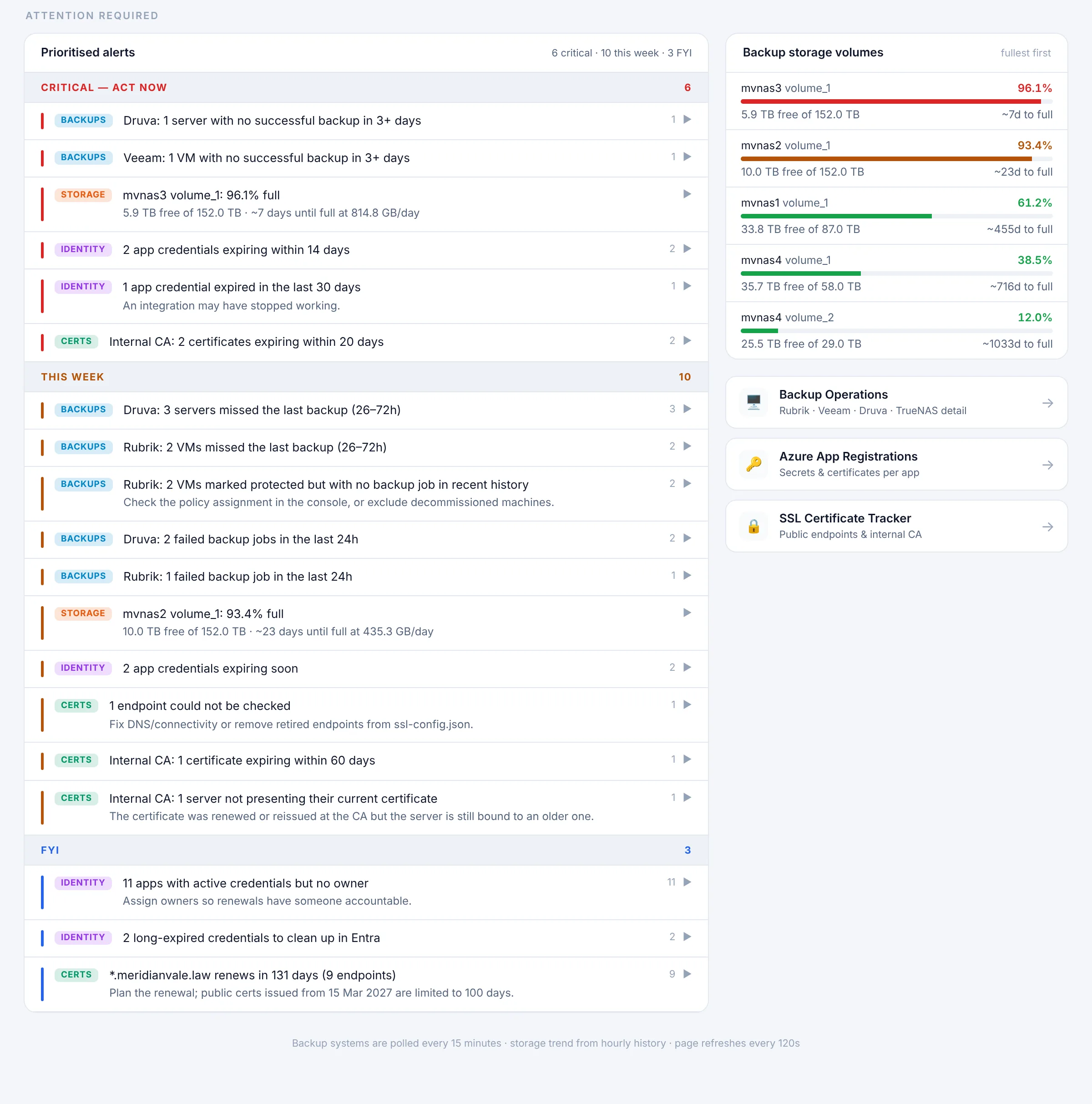
Ranked, not just listed
Severity comes from impact and time left, so the top of the list is always the next thing to fix.
Snooze with a reason
Known issues can be acknowledged for a set number of days. They come back on their own, and come back early if they get worse.
In the inbox at 7:30
A weekday digest email lists the critical and this-week items, so the day starts with the answer instead of the hunt.
Protected means a recent good backup.
A 96% job success rate can still hide a server that hasn’t backed up in a week. The Command Center tracks every server and VM individually: protected if its last good backup is within 26 hours, at risk within 72, unprotected after that, and unverified if the hypervisor says it’s protected but no backup job has run at all.
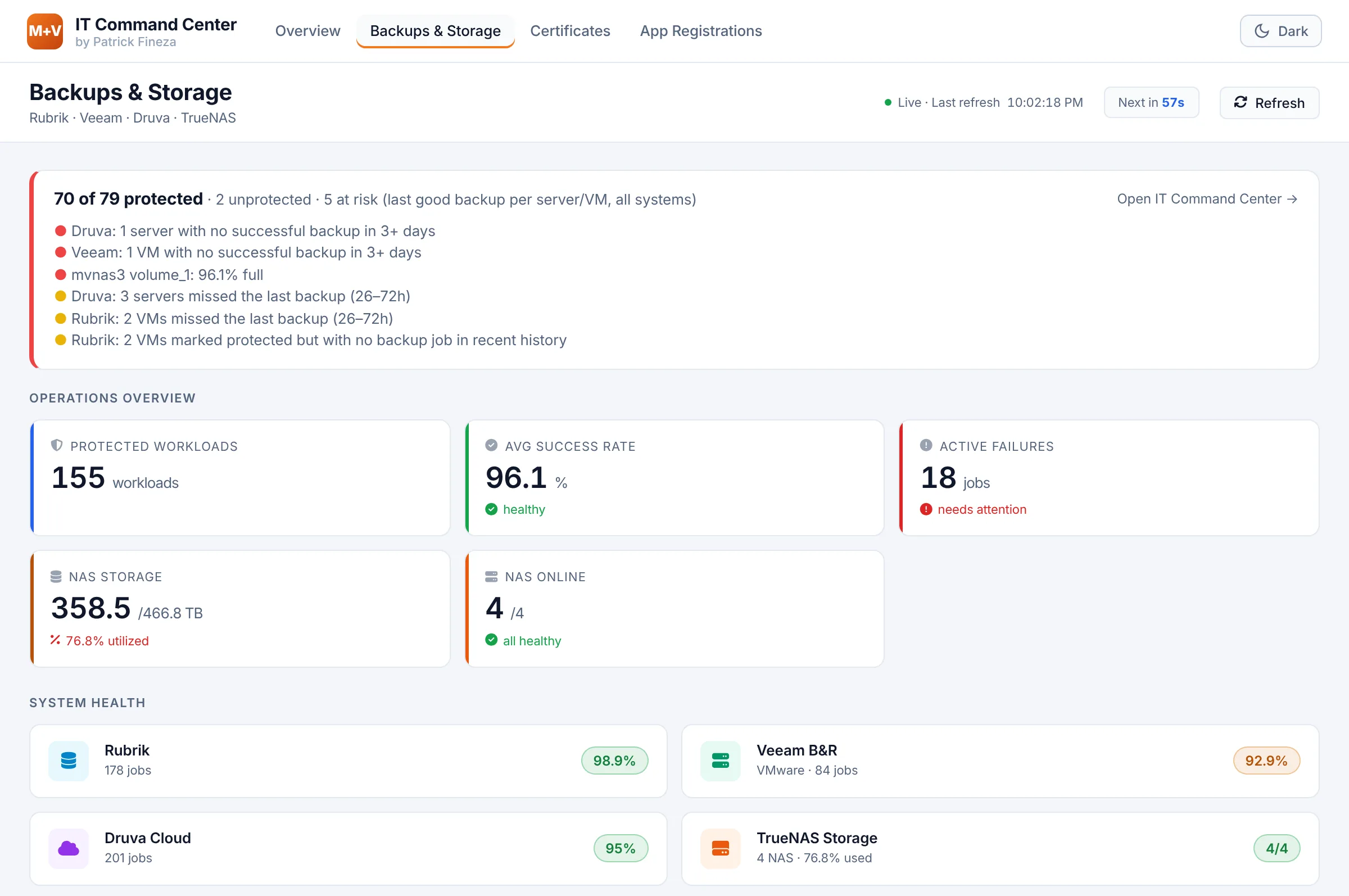
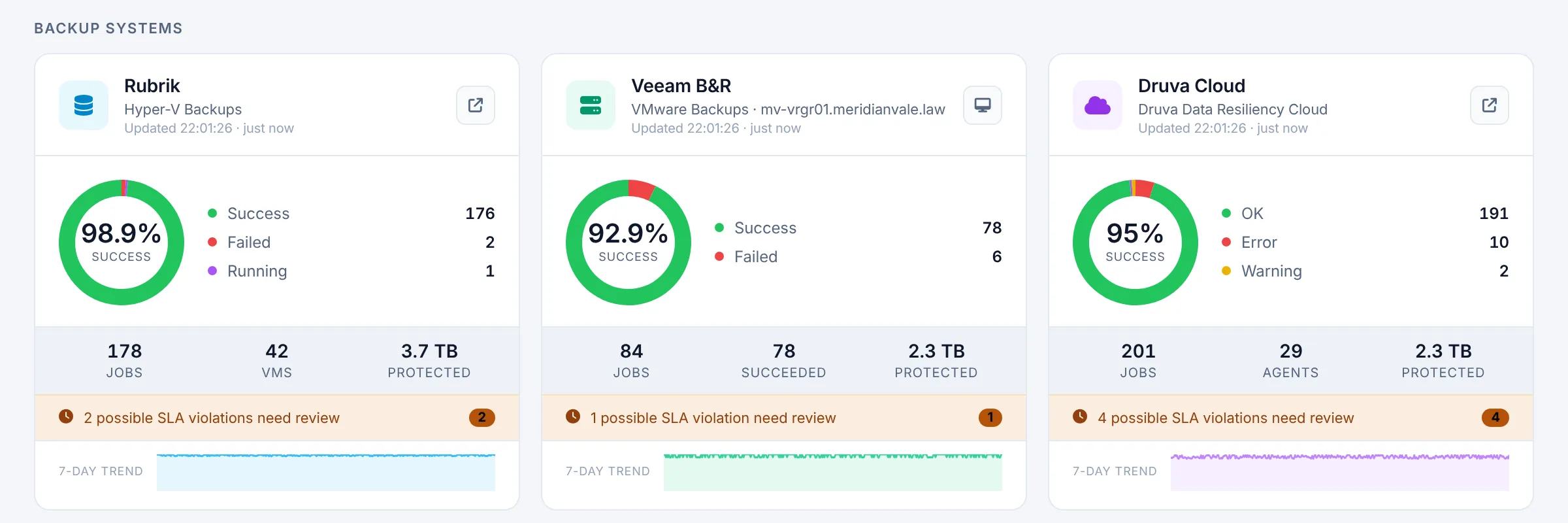
Demo environment: 70 of 79 workloads protected, and two VMs marked protected in the hypervisor with no backup job at all. A success rate alone would never show that.
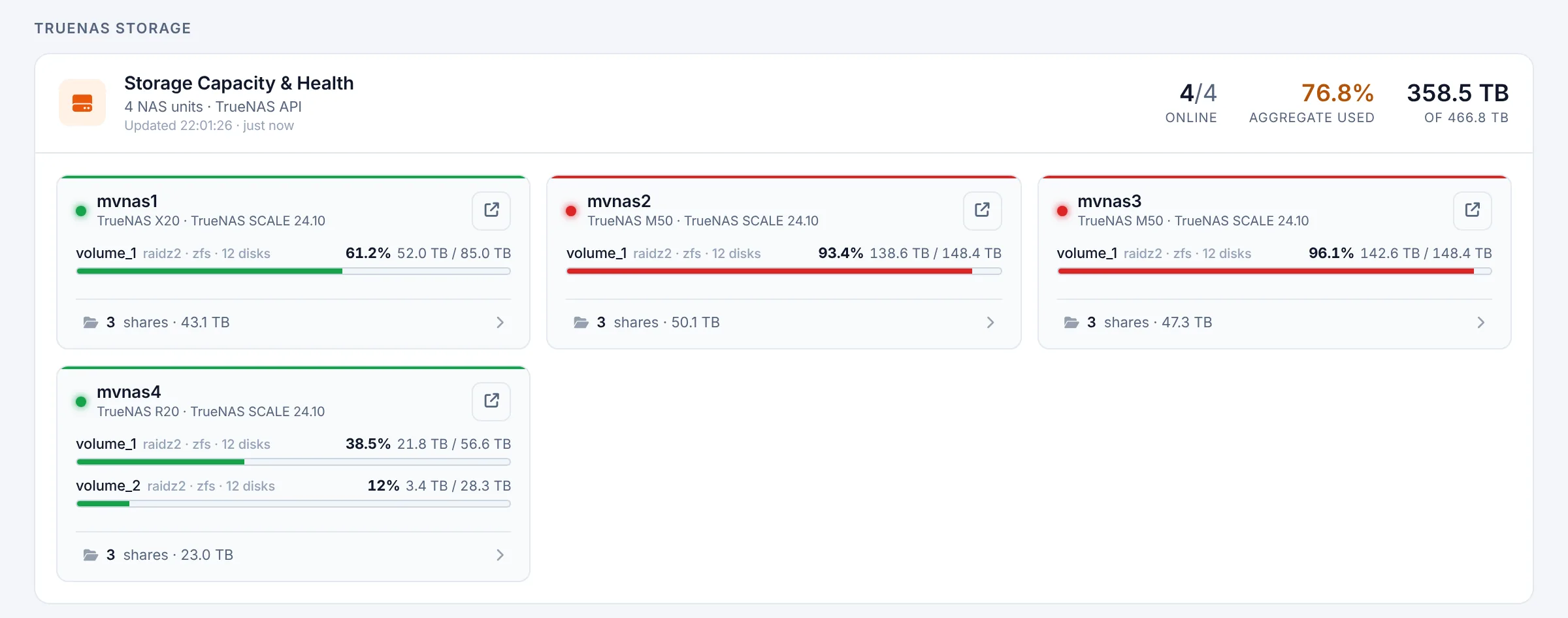
Days until full, not just percent used.
Each storage volume is trended from two weeks of hourly history, so the page says how many days are left at the current growth rate. A target that is filling up shows up as a forecast days or weeks ahead, before backup jobs start failing for lack of space.
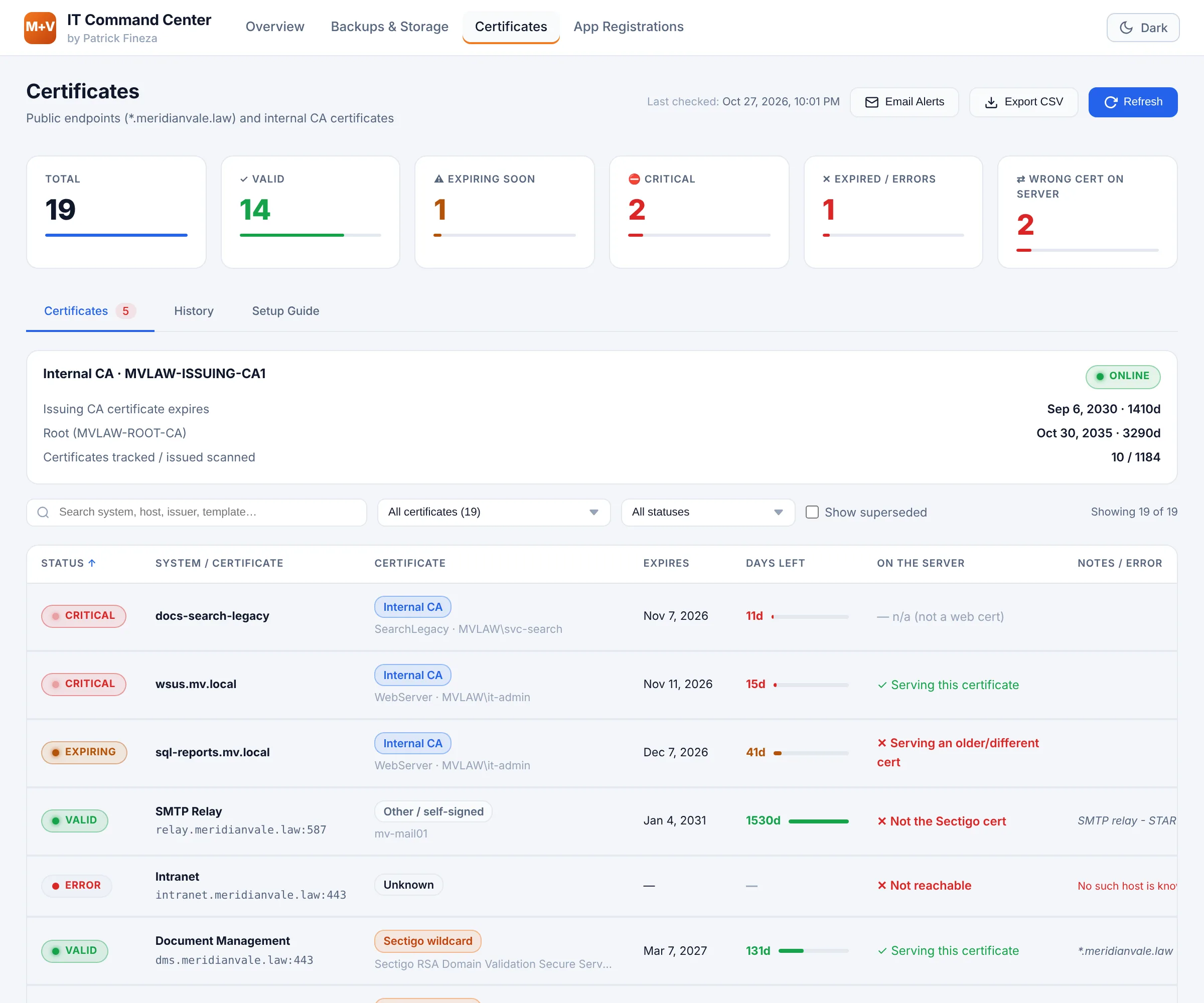
Every certificate. Public and internal.
Public endpoints are checked live; the internal certificate authority’s database is read every four hours. Both land in one sortable list, filterable by whether a system uses the public wildcard, the internal CA or something else. It catches what calendars miss: a certificate renewed at the CA but never installed on the server, and a system listed on the wildcard that is actually serving a different certificate.
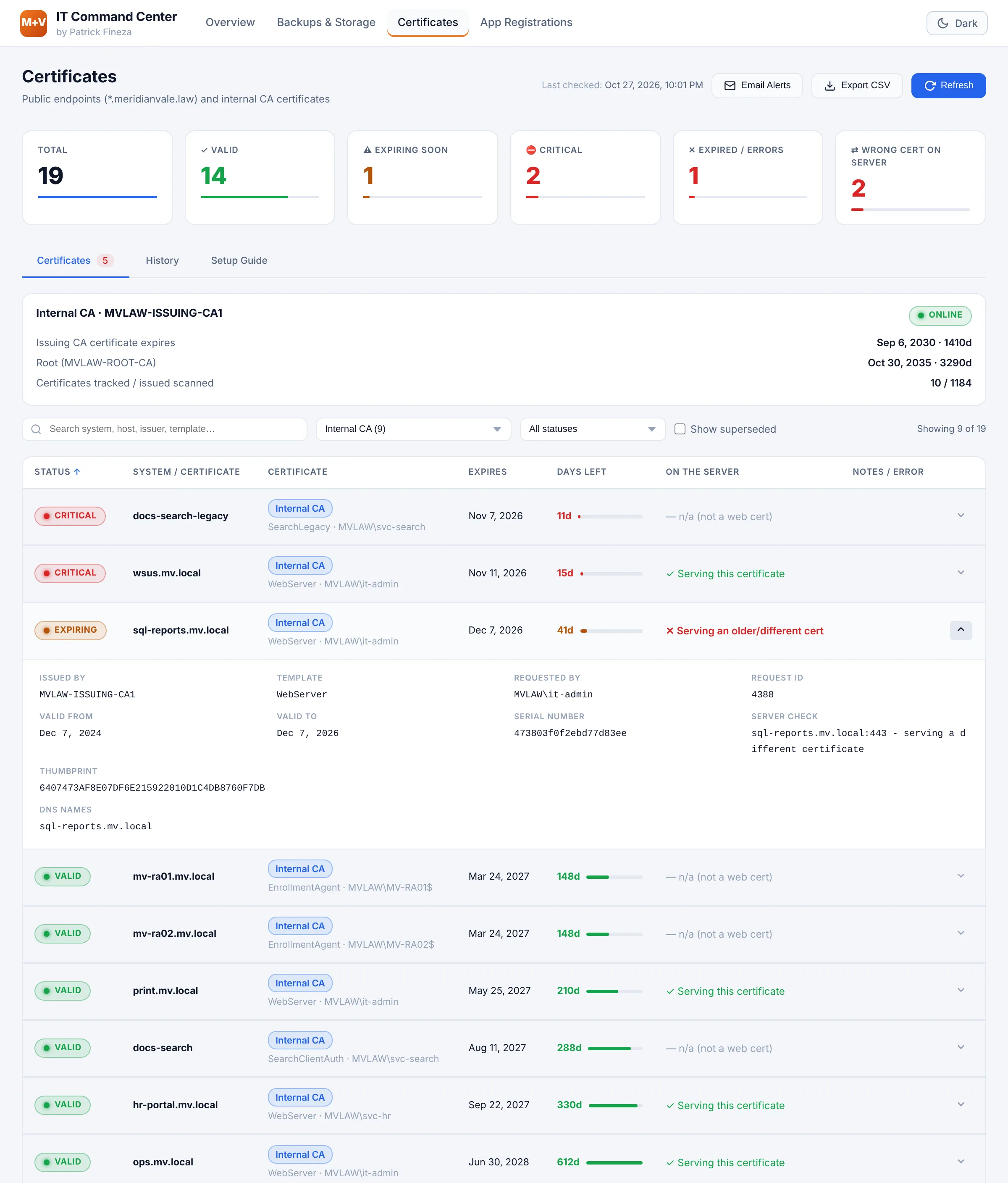
New certificates appear on their own
Anything issued by the internal CA shows up at the next scan. Auto-renewing machine and user certificates are left out so the list stays useful.
Renewals understood
When a certificate is renewed, the old copy is marked superseded instead of raising a false alarm.
The CA watches itself
The issuing and root CA certificates are tracked too, with a warning a full year before they expire.
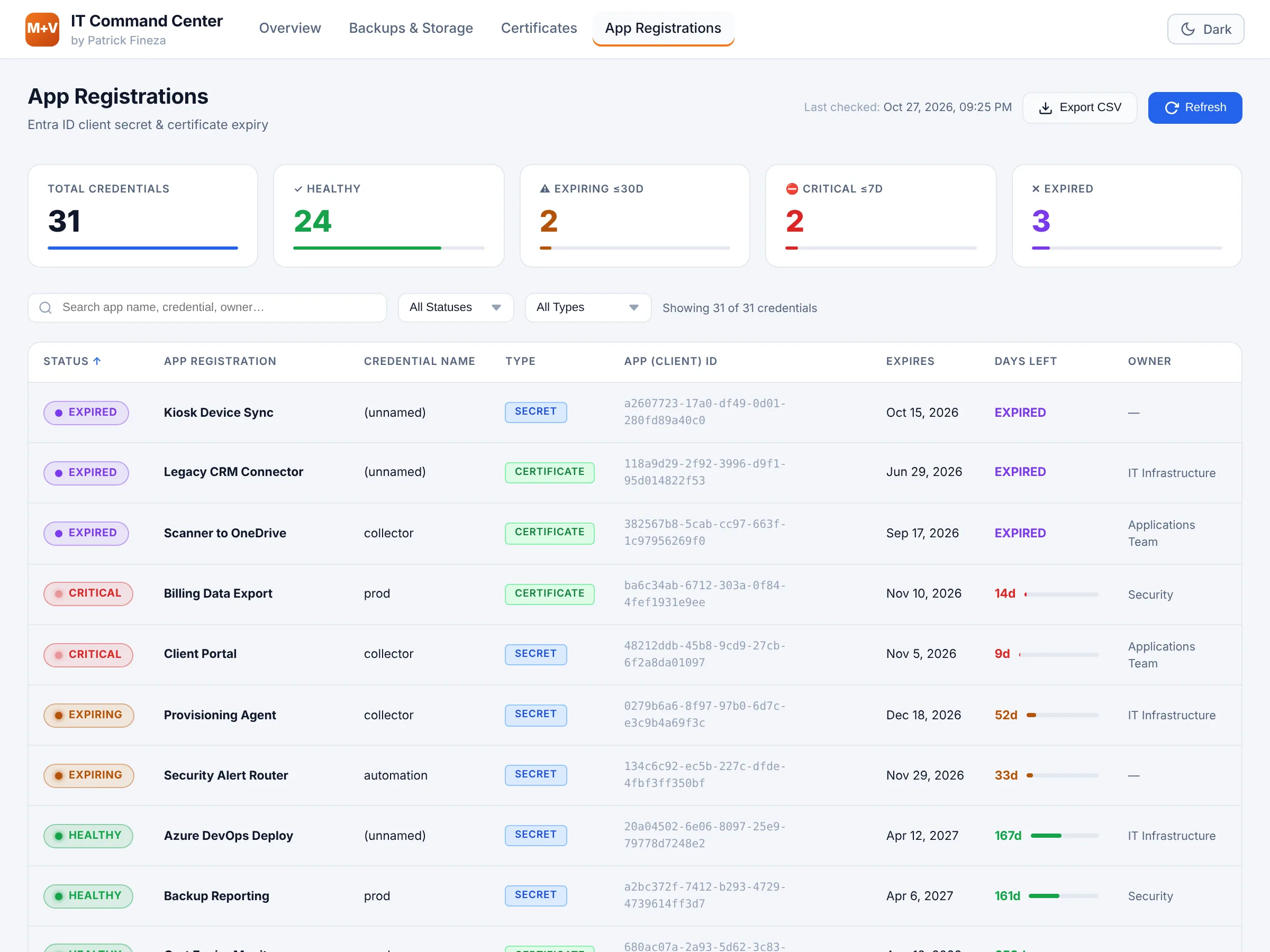
Secrets expire. Integrations shouldn’t.
Every Entra ID app registration’s secrets and certificates, read through Microsoft Graph, with days left and owner. Credentials expiring within 14 days are critical; apps with no owner are flagged so every renewal has someone accountable.
One app. Light or dark.
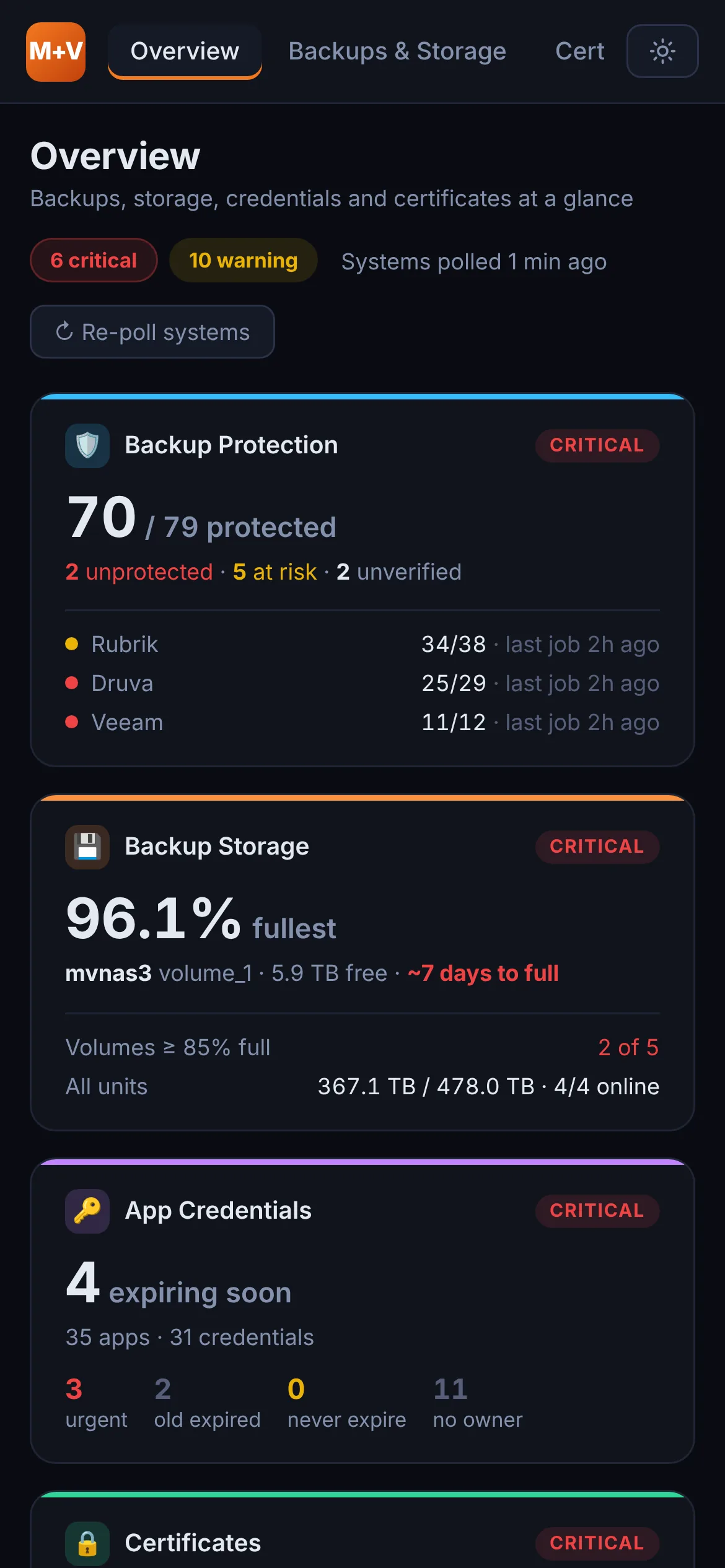
Every dashboard shares one navigation bar, one look and one light/dark setting that follows you from page to page, and every page reflows for a phone.
How it works.
No new servers, databases or cloud services. One existing IIS server, a small Python service and scheduled PowerShell collectors.
Sources
- Rubrik, Druva and Veeam backup APIs
- TrueNAS storage API
- Microsoft Graph (Entra ID apps)
- Live TLS checks of public endpoints
- Internal CA certificate database
Collect
- Python service polls every 15 minutes
- PowerShell collectors on a schedule
- Hourly history kept for 45 days
- Read-only accounts for every source
Model
- Per-server protection status
- Storage days-until-full forecast
- Certificate and credential expiry bands
- Ranked alerts with acknowledgements
IT team
- Windows sign-in, AD group access
- One app: shared navigation and theme
- Weekday digest email
- Desktop, phone, light and dark
Secure by default.
It reads from the systems that protect the firm’s data, so it was hardened like one of them.
Only IT sees it
Windows authentication and IIS URL authorization limited to one directory group, over HTTPS. Anyone else gets a clear no-access page.
Read-only everywhere
Every backup, storage and directory connection uses a read-only account or permission. The dashboard can look, never change.
Secrets off the web
Credentials live in a locked-down folder outside the web root, are never part of a deployment, and were rotated during hardening.
Nothing exposed directly
The Python service only listens on the server itself, behind an IIS reverse proxy. Scripts and config files are blocked from the web.
Safe to change
Every deployment previews its changes, backs up the live site, runs an automatic smoke test and offers a one-step rollback.
Shared server, protected
Other applications on the same server are isolated from the Command Center’s settings, and the smoke test checks them on every deploy.
Impact.
What the Command Center changed for the team.
Backups verified per server
Coverage is measured machine by machine, so a server that silently stopped backing up is found in hours, not at restore time.
Storage problems seen early
Days-until-full forecasts turn a failing-backups incident into a planned capacity task.
No surprise expirations
Public certificates, internal certificates and app secrets are tracked in one place, with owners and lead time.
Faster mornings
One ranked list and a digest email replace a tour of separate consoles.
Trust in the data
A data-sources tile shows how fresh every feed is, and a stale or failing collector raises its own alert.
Low cost to run
Runs on existing infrastructure with no new licenses, and updates ship from a laptop with one script.
My role.
From question to production
- Product: defined what “protected”, “at risk” and “needs attention” mean for an infrastructure team, and what belongs in a morning digest.
- Architecture: one service and one alert model for any number of sources. Adding a source means a collector, not a rebuild.
- Data: per-server protection rules, storage forecasting, certificate and credential expiry bands, alert ranking and acknowledgements.
- Design: several separate dashboards unified into one app with shared navigation, branding and theme.
- Infrastructure: IIS reverse proxy, HTTPS from the internal CA, Windows authentication, scheduled collectors and least-privilege service accounts.
- Operations: security hardening and credential rotation, a laptop-to-server deployment with backups, smoke tests and rollback.
Built with an AI pair programmer, directed through requirements, review and testing.
Built with
What’s next
- Microsoft 365 backup status alongside the on-premises platforms
- Monthly trend reports for IT leadership
- Restore-test tracking next to backup status
- New data sources as the environment grows